
Unlink an Activity
If you no longer want an activity, goal or checklist to be linked, you can easily unlink it:
- Locate the action you want to unlink.
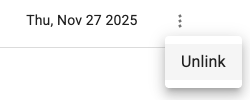
- Click the overflow menu (three vertical dots) on the right side.
- Select Unlink from the dropdown.
The action will be immediately unlinked.
Note:
- "Unlinking" will not delete the activity