
Release Notes
We are continuously improving! These are the latest features 🌈 and bug fixes 🐞
19 Nov 2026
version 803
New Features & Enhancements
- Checklist Schedule Governance: Set "Overdue after" and "Automatically discard when overdue" fields to read-only on the checklist schedule form to enforce template-level rules.
- Activity PDF & Export Upgrades:
- Embedded BI Charts: Activity PDF exports now render embedded BI report charts alongside tables and summaries.
- Image Page Headers: Added support for adding custom image page headers to generated activity PDFs.
- Activity Import Preview: Added a preview step before completing an activity import so administrators can verify data mapping prior to execution.
- Annual Asset Calendar View: Added a Year option to Calendar Mode in Asset Calendar Report Settings.
- Shift Management on Mobile: Added full shift management, shift filtering, and shift-aware assignment capabilities to the mobile phone experience.
- Integration link improvements: External identifier fields now render as clickable hyperlinks when formatted as URLs.
Bug Fixes
- PDF & Layout Rendering:
- Fixed an issue where formatted table cells in activity PDFs displayed raw
HTML entities and stripped out line breaks. - Fixed a layout bug in A3 sections where resizing a DIAGRAM field in Edit Layout failed to increase its vertical height.
- Fixed an issue where formatted table cells in activity PDFs displayed raw
- BI Reports Configuration: Fixed a bug where the BI report date range filter disappeared when section filters were enabled, and clicking Clear in settings failed to save.
- Search & Permissions: Fixed Team Members search so unchecking "This site" properly includes enterprise users who do not have direct site access assigned.
12 Nov 2026
version 802
New Features & Enhancements
-
Checklist Template History & Version Comparison:
- Added a dedicated Checklist Template History log to track changes over time.
- Aligned the Checklist Template Version View with the current template layout so historical revisions are clean and easy to review.
- Reporting Enhancements:
- Richer Activity PDFs: Activity PDF exports now render embedded BI report tables, single-number cards, and AI summaries.
- Working Days in FAL Filters: Updated the "Last X days" filter in Filtered Activity Lists (FAL) to respect configured working days.
- Expanded Activity Data Exports: Activity exports now include custom fields embedded inside sections.
- Skill Ownership Controls: Restricted skill editing so modifications can only be made within the skill's originating site.
- Workflow, Automation & UI Polish:
- Collapsible Team Shifts: Team pickers across the platform now allow expanding and collapsing shifts nested beneath their parent teams.
- Multi-Participant Selection UX: Improved the user interface for selecting multiple participants at once.
Bug Fixes
- Checklist & Diagram Editing:
- Fixed a cursor-jumping issue when typing inside checklist rich-text fields so text stays smoothly in place.
- Resolved a visibility bug preventing text inside Diagrams from displaying properly.
- Skills & Authentication:
- Fixed search indexing in Skills so training templates can be reliably found by title.
- Resolved a preview rendering error that corrupted the layout of skills templates.
5 Nov 2026
version 801
New Features & Enhancements
- Checklist Template Versioning: Added native version control for checklist templates, allowing teams to track iterative template updates safely over time. With version history you can:
- See every published version of a template, newest first, with the date, the person who published it and their reason for the change.
- See exactly what changed in each version: questions and sections that were added, changed, moved or removed.
- Compare any two versions side by side.
- Preview an older version the way it appears on a phone.
- Restore an older version as a new draft, then publish it as the next version.
- See which template version a checklist was started from.
- Equipment Data in Checklist Exports: Checklist data exports now include linked equipment details.
- Comprehensive Approval Workflows: Introduced a complete multi-step approval framework for activities, including:
- Flexible Signing Rules: Support for multiple people to approve in series, in parallel or "any sign-off" configuration, and automated status-change rules upon approval.
- Shifts: Integrated shifts into teams, including tracking into external API endpoints.
- Consistent Empty States: Updated the Filtered Checklist List (FCL) empty state to match the layout and styling of Filtered Activity Lists (FAL).
- Team Member History: Adding or removing team members from a team page is recorded as an audit entry in the individual's profile history.
Bug Fixes
- Skills & Training Retention:
- Fixed an issue where historical training events vanished from the Training Events list whenever their associated template was detached from a skill.
- Prevented checklist templates from being deleted if they are actively linked to an existing skill.
- Table Styling: Fixed an issue where table cells with conditional color formatting failed to reset to their default color when conditions were no longer met.
- Embedded Analytics & Qlik Integration: Resolved parameter mapping failures, UI validation bugs, and embedding configuration issues with embedded Qlik reports.
29 Oct 2026
version 800
New Features & Enhancements
- Checklist Template Upgrades:
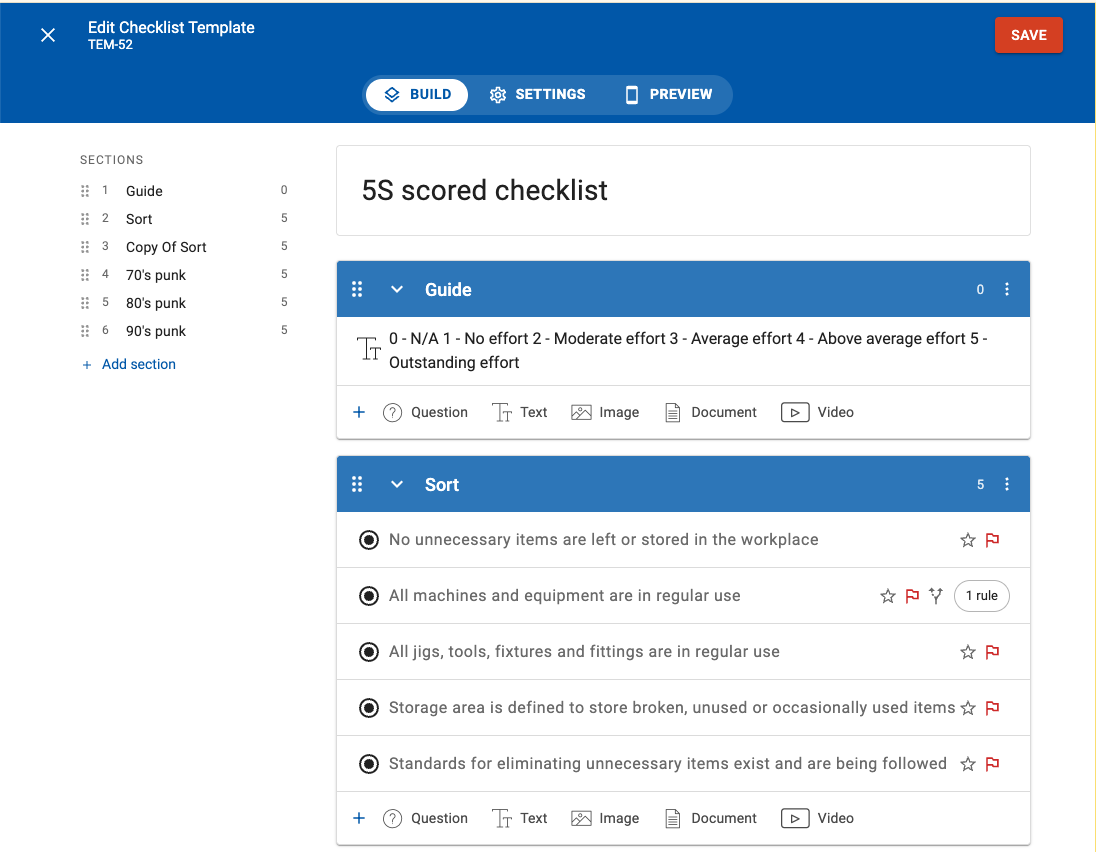
- Reorganized the editor into clear Build, Settings, and Preview tabs for an improved authoring experience.
- Preview has Desktop and Mobile device modes
- SECTIONS are listed on the left-hand side for faster navigation, and drag-and-drop reordering
- Icons displayed in each row to indicate;
- 🔴 Mandatory (must be answered) questions
- ⭐ Scored responses
- 🚩 Responses that will trigger a flag
- 🔀 Conditional rules
- Moved the adding of a Question/Text block/Image/Document/Video from behind a ➕ button to the bottom of each section for faster creation
-
- Site Availability Inheritance: Skill checklist templates now automatically inherit site availability rules from the skill (not the checklist template). This change is to prevent accidental removal of templates that are in use at sites.
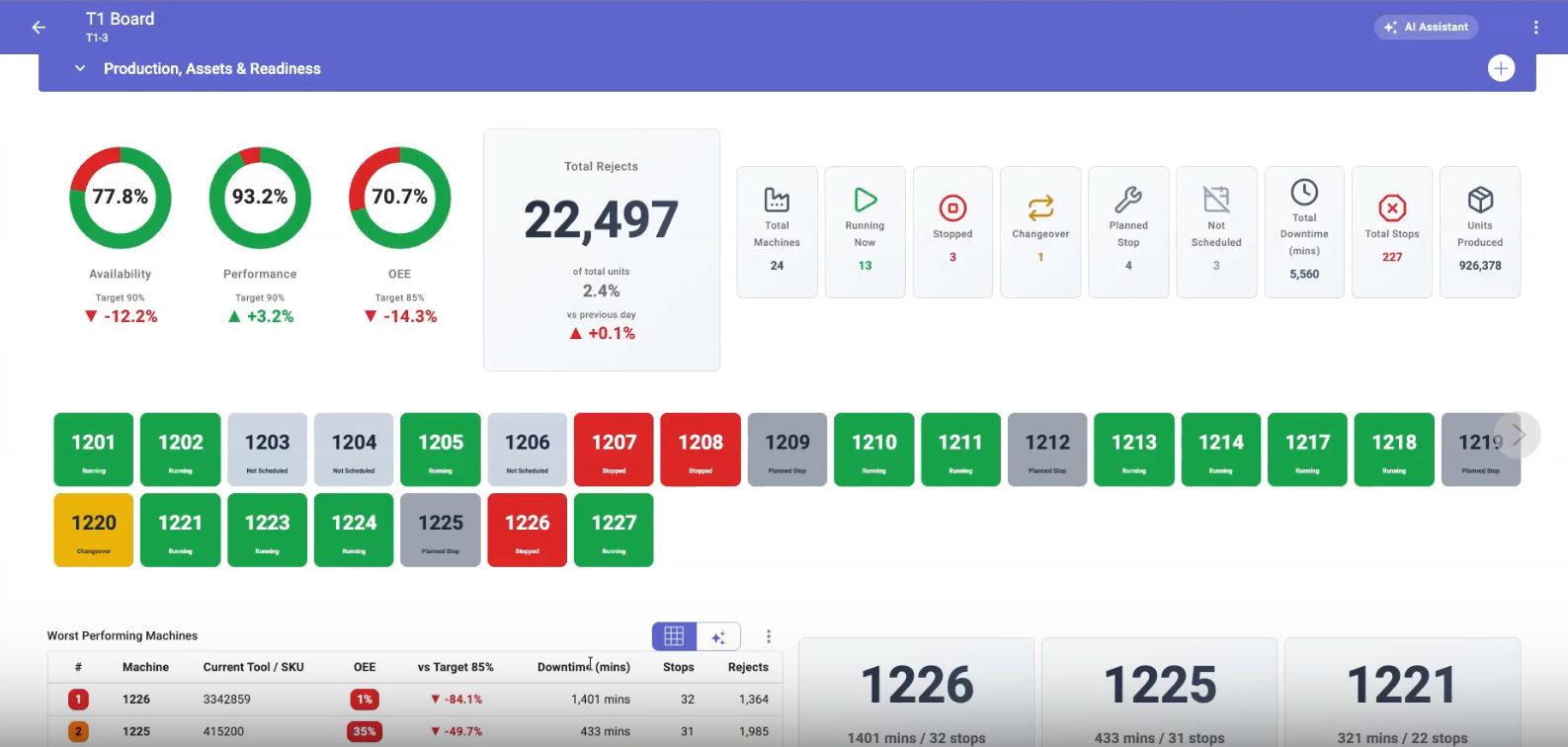
- Advanced Analytics & TABI Visualization (beta):
- Custom Table Formatting: TABI tables now support extensive styling including fixed, rule-based, or calculated cell/text colors, custom fonts, alignments, number formats, and borders.
- Enhanced Number Cards: TABI Number Cards now support multi-card row strips, optional icons, hideable labels, tertiary display values, and customizable color picks per value.
-
- Shift Operations & Workflow:
- Shift-Aware Assignee Selection: Introduced shift-aware "Assigned To" selectors and default assignee logic to route tasks based on working shifts.
- Shift Filters on Boards: Filter board views directly by active team shifts.
-
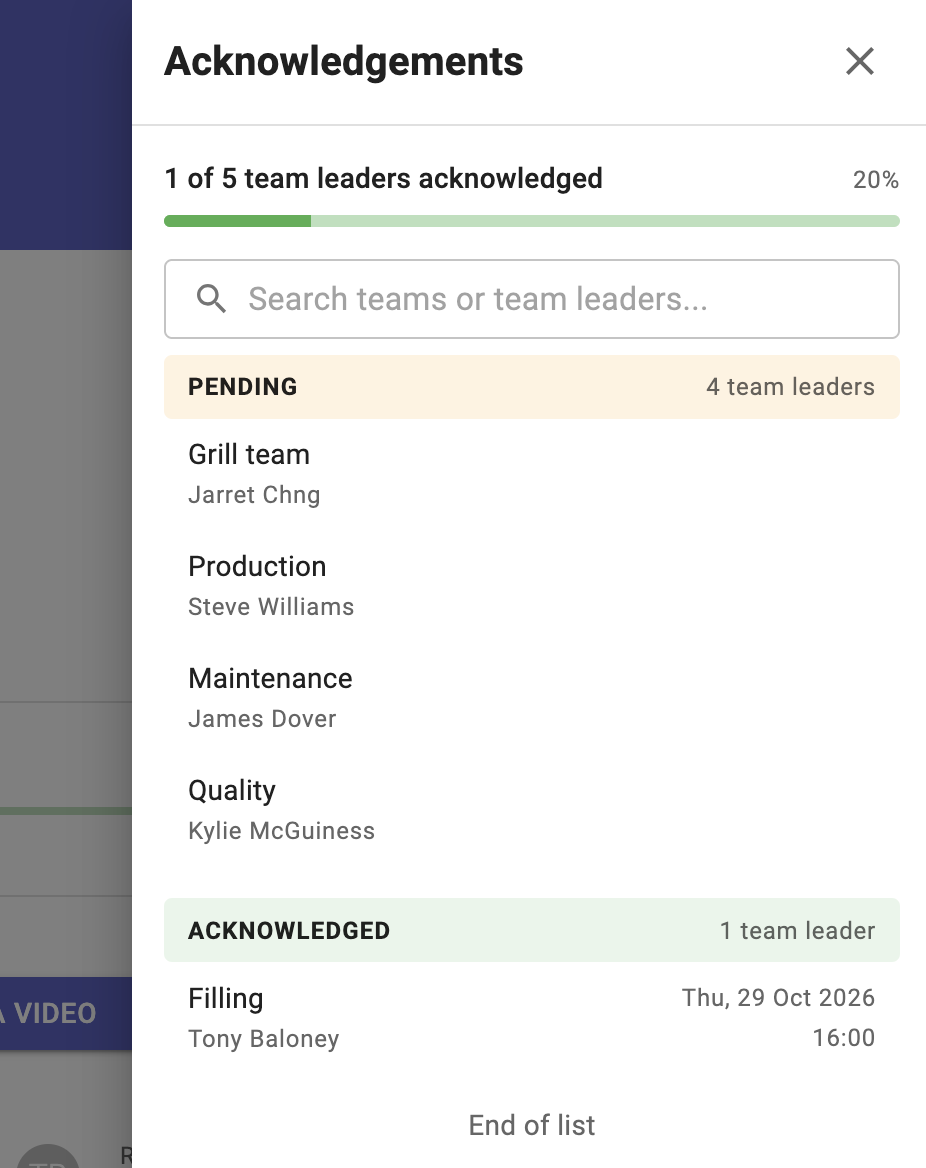
Acknowledgement Drawer Upgrades: The slide-out drawer for reviewing and completing activity acknowledgements will list by Team when the Team-leader toggle is selected, otherwise by individual user.
- Integration Enrichment: Shared more context and activity metadata inside Limble work requests created from TeamAssurance activities.
- Automation & System Management: The Automation Engine can now trigger upon checklist completion and dynamically update a linked activity using answers from specific checklist questions.
Bug Fixes
- Checklist & Schedule Integrity:
- Fixed an issue where checklist answers were saved in the wrong language when checklist glossary translations were active.
- Fixed a scheduling error where checklists set for "4th Friday Monthly" were incorrectly scheduling on 5th Fridays.
- Resolved excessive change log generation triggered against checklists.
- Updated Filtered Checklist List (FCL) column configurations so they save at the system level rather than defaulting to individual user preferences.
- Cleaned up initial template loading so the published template filter returns all published items without truncation.
- Editor & Table Stability:
- Fixed a rapid-entry bug where inserting multiple table columns in quick succession caused columns to save in the wrong order.
- Aligned standard embedded fields to match the layout and formatting of custom embedded fields.
- Permissions, Workflows & Data Alignment:
- Updated Team Hierarchy structures to group and sort by Team Name rather than Team Code.
- Fixed an issue where activity status transitions required a stale acknowledgement sign-off even after the acknowledgement field was removed from the activity type.
- Resolved date and time display inconsistencies on Supplier calendars.
22 Oct 2026
version 799
New Features & AI Platform Enhancements
- Agent Studio Upgrade: Introduced Agent Studio (beta). This brings built-in AI features, permissions management, and shared contextual background into a single studio environment. Currently in use with a small cohort of customers, before a wider announcement and roll-out.
- Checklist Recovery & Governance: Added the ability to restore deleted checklists.
- Hierarchical Team Structure: Support parent-child team relationships under Site Settings > Teams, making organizational structures easier to model and navigate. The tree structure is only represented in the Site Settings. Within the app, the Teams continue to be presented in a flat list.
- TABI & BI Analytics Enhancements: Added relative date range filters for last completed shift, day, week, and month.
- Skills Management & Scoping: Restricted skill lists to only display skills that belong to an active role at the currently selected sites.
- Custom Reporting & Tracking:
- Added support for Custom Team Member fields as displayable columns in Filtered Activity Lists (FAL).
- Goals Visual Clean-up: Removed background connecting lines between parent and child goals in the Goals List View for a cleaner visual grid.
- Permissions & Roles: Administrators can set a Team Leader when creating a new team.
Bug Fixes
- Checklist & Activity Management:
- Fixed sorting logic on Due Soonest checklist lists so completed and discarded checklists no longer pollute the bottom of each pagination page.
- Fixed a bug where Activity Cross-Linking generated duplicate links between identical items.
- Fixed an issue where activity Acknowledgements remained active after the underlying activity was soft-deleted.
- Reporting, Search & Timezones:
- Resolved a timezone display shift issue where dates shifted across viewer timezones in TABI tables and search date ranges.
- Corrected Skills Percentage calculations to exclude inactive users from completion metrics.
- Fixed Skills Name Search so queries matching full names (
First Last) return accurate results.
- Interface & Layout Stability:
- Fixed a dashboard section rendering issue where added sections ignored background color configurations on initial save.
- Resolved a display limit where the "ALL TEAMS" filter capped avatar renders at 30 items.
15 Oct 2026
version 798
New Features & Enhancements
-
Goal Management & Tree Reordering:
-
Drag-and-Drop Goals: You can now reorder sibling goals directly within the Goals list view using drag-and-drop.
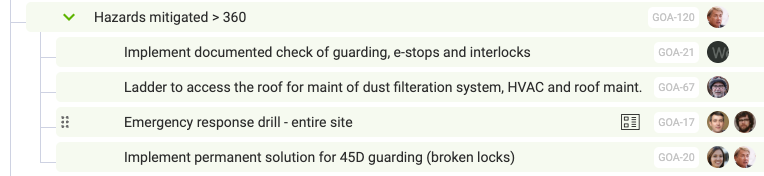
Hover to see the drag handle 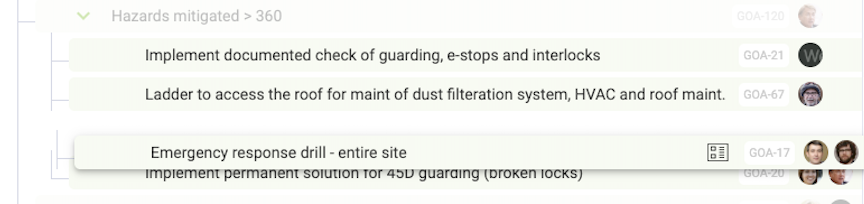
Move the Goal up or down the list
-
- Team Leader Acknowledgement: Introduced an explicit "Acknowledge by Team Leader" workflow step. This limits Acknowledgement of a One Point Lesson to Team Leaders, intended as a sign-off on behalf of their team.
- Checklist & Activity Automation:
- Filtered Activity Linking: Checklist schedules now support custom filters, automatically linking relevant activities to newly generated checklists upon creation.
- Header Data in Search Exports: Checklist search exports now include custom header fields.
- AI Flagged Question Awareness: AI Summaries for Filtered Activity Lists (FAL) and Filtered Checklist Lists (FCL) now evaluate and highlight flagged questions. The summary prompt could include: "Display outstanding checklists in order of the most flags"
- TABI & Analytics Upgrades:
- Date Range Slicing: Added a dedicated date range filter to TABI reports.
- Axis Display: Improved axis labels and formatting across TABI visualizations.
- UI & Navigation Polish:
- Site Selector Loading: Fixed layout shifts in the left navigation menu caused by slow-loading site selectors.
- @Mention Integrity: User names in
@mentionsremain unchanged during automated text translations. -
Team Settings Organization: Grouped related fields under Settings > Team for cleaner navigation.
Bug Fixes
- Permissions & Layout Constraints: Fixed an issue preventing users from removing or updating section elements inside team-restricted sections.
- Dashboard & Spreadsheet Interactions:
- Resolved an interaction bug where scrolling a table inside a Rech Text Editor caused the page to scroll to a new activity on mobile devices.
- Fixed row and column show/hide toggles in embedded spreadsheets.
8 Oct 2026
version 797
New Features & Enhancements
- Checklist Audit History: Logged more change types directly to the Checklist History for complete traceability.
Bug Fixes
-
PDF Rendering: Fixed an issue where custom fields embedded inside sections (such as Process Flow diagrams) rendered without values in downloaded activity PDFs.
Measures phases: Corrected an issue where Phases failed to render properly inside Measures embedded within section layouts.
Skills target: Fixed an edge-case bug where updating a target level on a new skill failed to refresh and update the Skills Matrix.
Checklist Scheduling: Resolved an issue that prevented users from starting an upcoming scheduled checklist.
Reporting, Search & Sharing:- Fixed a count inflation bug where applying an Equipment filter on enterprise-wide searches calculated inaccurate activity totals.
- Cleaned up the Asset Calendar report to stop displaying soft-deleted Locations and Equipment.
1 Oct 2026
version 796
New Features & Enhancements
- Advanced Reporting Slices: Added support for Slices across embedded dashboard sections and embedded BI reports, allowing for granular data controls per section.
- Skills - hide score: Added a configuration setting to hide training assessment scores from trainees while maintaining score visibility for trainers and managers.
- QR Code Schedules: Added a prompt warning if a QR-driven checklist schedule has already been completed for the current time period.
Integrations & API Improvements
- Category ID Aliasing: Standardized Integration API behavior so external systems see consistent Category IDs everywhere when an ID alias is configured.
-
Category Status Parameters: Updated the Integration API Category List response to explicitly flag deleted categories.
Bug Fixes
-
Skills & Training Accuracy:
- Expiring Skills Count: Fixed an issue where "Expiring this month" metrics counted skills that were no longer required for the trainee's role.
- Expiry Dates: Fixed a bug where skills displayed an expiry date before training was officially marked as complete.
- Targetless Skills: Resolved an issue where skills without a defined target level were incorrectly flagged as overdue.
- Email Reports: Corrected the weekly email overdue skills count to accurately align with the active Skills Matrix.
- Reporting & Visualizations:
- Measures: Resolved an error that prevented measures with conditional color rules from loading.
- Embedded Qlik: Saved session state for embedded Qlik reports so users remain logged in across page reloads.
- PDF Exports & Formatting:
- Fixed an issue where images embedded in activity tables overlapped neighboring columns in downloaded PDFs.
- Restored horizontal scrolling for wide tables in text sections to prevent text from truncating off-screen in view mode.
- Integrations & Performance:
- Resolved a data processing lag that could delay MES synchronization by up to 20 minutes.
- Fixed character encoding issues that caused emails containing non-English characters to render incorrectly.
- Fixed an edge case where saving an older checklist schedule could re-trigger and resend past completed checklists.
24 Sep 2026
version 795
AI Intelligence
- AI Chat Sidebar & History Search: Enhanced the AI Chat interface with a streamlined sidebar, built-in conversation search, and automatic history loading when switching chats on mobile.
- Continuous AI Chat Focus: Improved input handling so the cursor remains focused inside the chat box after sending messages for faster interactions.
- Video-to-Activity Formatting: Upgraded text formatting rules when auto-generating activities from video files to produce cleaner, structured descriptions.
New Features
- Localization Consistency: Resolved language-switching issues so custom field values in Filtered Activity Lists (FAL) remain intact when changing display languages.
Bug Fixes
- Role & Security Governance: Fixed an issue where default roles were being assigned to users at sites where those specific roles had not been enabled.
- Checklist & Activity Tracking: Resolved an issue where viewing one checklist caused sections to incorrectly disappear on a subsequently opened checklist.
- Supplier
- Fixed missing completion date displays when viewing completed activities with linked checklists.
- Fixed a supplier workflow issue preventing automatically reassigned certificates from being returned to the previous holder.
16 Sep 2026
version 794
New Features
- Flexible Date Filtering: Added dynamic "Date Raised" filtering options (last X hours, days, or weeks) across activity views. The hours option was introduced to assist with Filtered Activity lists and shift handovers.
- Subcategory Data Exports: Activity data exports now include complete subcategory breakdowns.
AI Features (beta)
- AI Chat Side Panel: Introduced a dedicated UI side panel for the AI Chat interface to keep conversations accessible alongside your active workspace.
- Embedded BI Summaries & Controls: Added auto-generated AI Summaries directly to embedded TABI Reports
- Expanded AI Tools & Filters:
- Exposed additional filters and search parameters inside AI Chat, including counts and detailed breakdowns for activity search results.
- Integrated MES (Manufacturing Execution System) data context directly into AI tool routines.
- Multi-Site Customer Documentation: Provide the AI Chat more context by uploading your equipment user manuals, troubleshooting guides etc. Each document can be made available to the AI Chat at one site, selected sites or all sites.
Bug Fixes
- Checklist Scheduling: Fixed a critical bug where saving an executed fixed checklist schedule would incorrectly reset the schedule back to its initial occurrence.
11 Sep 2026
version 793
New AI Features (beta)
- Video to Activity AI Generation: You can now automatically generate and populate a new Activity directly from a video file, extracting key details and screenshots from the video instantly.
- MES Charting: Expanded manufacturing metrics integration with dedicated support for MES charts directly within dashboards.
Bug Fixes
-
Rich Text & Data Tables:
- Fixed an issue where users were unable to mirror tables on Dashboards.
- Resolved a bug where Measures were failing to refresh after deleting a table column.
8 Sep 2026
version 792
New Features & AI Upgrades
- Measure performance improvement: Measures are now faster to display.
- AI Chat History (beta): Return to recent chats and continue the conversation.
4 Sep 2026
version 791
New Features & AI Upgrades
-
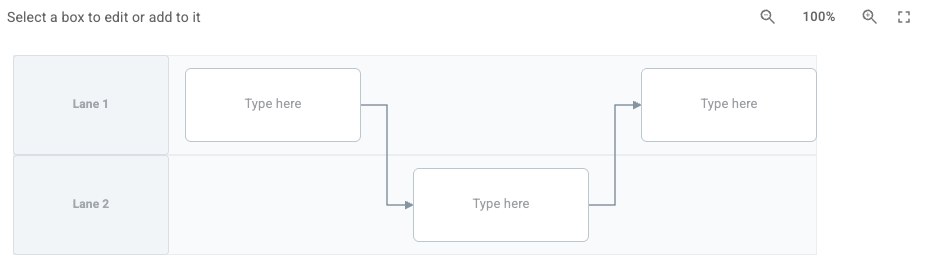
Diagram Activity Field: Introduced a dedicated Diagram custom field for activities, allowing teams to capture visual schematics and spatial layout data directly within forms. Four formats. Currently available on request and will roll out later this year.
- Help-Aware AI Assistant: Integrated live platform help documentation into the AI Chat Assistant (beta), enabling it to answer product usage questions and guide workflows directly.
- New Language Support: Added translation support for Finnish and Romanian.
- Glossary: Introduced a language Glossary to override automatic translations.
System & API Enhancements
- MCP Server Search Parity: Added Checklist search filters to the MCP server API, bringing its query capabilities up to speed with the main application search.
-
Monthly Calendar Optimization: Improved database queries to resolve timeout issues on high-volume Monthly Calendar views.
Bug Fixes
- Remove cell background color: Fixed an issue where copied table rows or columns retained cell background colors with no way to clear them.
28 Aug 2026
version 790
New Features & AI Intelligence
- Related Activities AI Assistant (beta): Introduced a new AI assistant that intelligently identifies and surfaces related activities, helping teams spot recurring issues and connected tasks faster.
- Custom FAL AI Summaries (beta): Added the ability to override default prompt behaviors for Filtered Activity List (FAL) AI summaries, allowing teams to tailor insights to their specific operational needs.
- Intouch AI Integration (beta): Expanded AI connectivity with new integration capabilities for Intouch MES.
-
Custom Aggregations in Multiline Measures: Multiline Measure templates now support customizable aggregation options per data series. This allows a daily measure to rollup to a weekly/monthly etc as a sum, or average, per series on the same measure. Previously it only allowed to sum.
Enhancements & Data Management
- Checklist search: Added a dedicated search box option to Filtered Checklist Lists (FCL) for faster inline filtering. This includes Checklist header field data.
-
Enterprise Access Governance: Assign a Security Role (e.g. Admin, Checklist Admin, Skills Trainer) to a user at the Enterprise level. They will inherit that role on all current and future sites they are added to.
Bug Fixes & System Stability
-
API & System Performance:
- Fixed an issue where the MCP
list_usersendpoint would unintentionally attempt to write/update user data. - Optimized API request routing to eliminate redundant requests to the enterprise endpoint (
GET /enterprise/{code}). - Resolved a data storage boundary error where large activity detail payloads exceeded Azure table store limits.
- Fixed an issue where the MCP
- Public Checklists: Resolved an issue causing intermittent "Not Found" error pages on public checklists.
- Mobile Responsiveness: Improved horizontal scrolling behavior on TABI reports when viewed on mobile screens.
20 Aug 2026
version 789
New Features & Enhancements
- Checklist Search & Logic Improvements:
- Custom Field Search: Checklist Search now indexes and queries checklist custom fields for more comprehensive results.
- Expanded Conditional Rules: Multi-select checklist questions can now be used as triggers for Conditional Rules.
-
Direct Template Links: Added a "Copy Link" menu option to Checklist Templates for quick sharing across teams.
Translation: - Glossary Management in Account Settings: Administrators can now directly manage organization-wide override translations within Account Settings. Entries in the Glossary will override automatic translations.
- Glossary Application to Comments: Translations defined in the glossary are now automatically translated and formatted within activity comments.
Enhancements & UX Refinements
- Mobile Responsiveness: Improved horizontal scrolling behavior on mobile browsers to prevent accidental swipe to next activity.
- Skills Tracking: Setting up new skills now automatically pre-populates and displays the configured Default Target Level (3).
- Report Cleanup: Deprecated and removed the legacy "Activities List" report in favor of standard Filtered Activity lists and search capabilities.
- Category:
- Enabled sort on the Category column in a Filtered Activity list. Note that if there are multiple categories (e.g. Safety and Quality), it will sort based on the first-listed category.
- Allow category field to start with nothing selected, forcing the user to select.
Bug Fixes
-
Activity & Checklist Stability:
- Fixed an issue where shared activities were incorrectly classified as New for the originating team
- Fixed an issue where public checklists failed to retain pre-filled custom field values upon submission.
- PDF & Media Fixes: Fixed a generation error where downloading an activity as a PDF failed if it contained embedded
.webpimages. - UI Cleanups: fixed an issue where pasted text in Rich Text fields had additional whitespace that could not be deleted.
13 Aug 2026
version 788
New Features & Enhancements
- Table Editing Improvements: Adding new rows or columns to tables now preserves the formatting of adjacent cells.
- AI & Document Generation: Improved AI-assisted checklist template generation for large source documents. Take any existing inspection or checklist and upload it to TeamAssurance, and it will automagically create the template. Works for pdfs, word, excel, scanned documents. Also helpful if migrating off iAuditor or similar.
- Improved Notification System: Introduced clearer, more prominent UI notifications for background actions like completed file downloads. File download links are available in the notification area (behind the bell icon)
- Site Administration: Site Administrators can now directly edit Team Codes from the administrative settings.
- Checklist Reporting: You can now sort Filtered Checklist Lists (FCL) using custom header fields.
Bug Fixes
-
Dashboard & UI Stability:
- Resolved a layout crash that occurred when editing a dashboard section containing an embedded Qlik report.
- Increased the whitespace beneath the Location of Event field on the Activity Creation screen for improved readability.
- Restored placeholder text behaviour for the Details field in the Create mode for activities.
- Supplier & Auditor Workflows:
- Fixed a supplier reassignment bug where reassigning an activity back to an auditor with multiple teams reassigned to the incorrect team.
6 Aug 2026
version 787
New Features & Enhancements
- Background Data Exports: Team Member Exports are now processed asynchronously in the background. You can continue working while the export generates and download the file once it's ready. The file is a link in the notification tray (bell icon).
- Skills Management: Added the ability to set a Default Target Level for Skills, speeding up skill matrix setups for new roles and team members.
- Localization: Added full translation support for the Monthly Occurrence Calendar.
- TABI CSV Export: Added CSV export capabilities for customised TABI reports, making it easier to analyze and manipulate your data in external spreadsheet tools.
Bug Fixes
- Checklist: Optimized performance for checklists with complex conditional rules to prevent UI stuttering and visual glitches.
- PDF Downloads: Fixed an issue where photo and image attachments were failing to embed or render correctly when downloading an activity as a PDF.
- Added both character length validation for custom fields to prevent data truncation.
- Resolved a crash that occurred when scrolling horizontally through Report Groups.
30 Jul 2026
version 786
New Features & Enhancements
- Checklist Header Fields: Add custom fields to Checklist templates that sit alongside other header fields in Checklists (like Assignee and Due Date), allowing for clearer context and structured data collection at the top of your forms.
- Direct Record Linking: You can now copy a direct link directly from any Record Identifier (e.g. ACT-123), making it quicker to reference and share specific items with teammates.
- Faster Image Uploads: Implemented client-side improvements, significantly speeding up photo attachments across the platform.
- Visual Feedback: Added a smooth loading indicator when high-resolution images are resizing, so you always know when content is loading.
Bug Fixes
- Checklist & Schedule Stability:
- Fixed an issue where adding a Checklist Participant to a Scheduled-status checklist did not save.
- Resolved an issue where infinite scrolling failed for embedded Filtered Checklist Lists (FCL) inside dashboard sections when the layout had been changed.
- Ensured locale-specific date formatting is properly applied within Restricted activities.
23 Jul 2026
version 785
New Features & Enhancements
- Expanded Shared Section support to allow Embed external pages and Report groups.
- Future scheduled checklists using rotating team assignments will now display the assigned team member ahead of time.
- Deleting a Goal now smoothly redirects you back to the Goal List/Tree view.
- (Admin) Category ordering is now visually reflected throughout the user interface.
Integrations & Performance
- Optimized backend transitions when starting, saving in progress, and completing checklists, significantly reducing latency and load times.
- API & MCP Fixes:
- Fixed a dependency issue that caused REST API service interruptions.
- Fixed an issue preventing the MCP server
GET /sitesendpoint from authenticating with Enterprise API keys.
- Corrected a status mapping issue with the Limble integration to ensure seamless state syncs between Limble and your activities.
Bug Fixes
- Resolved a bug where skills were being double-counted if a user was mapped to the same skill through multiple roles.
- Shared Sections Stability:
- Fixed an issue where Shared Sections were inadvertently deleted when applying the "Make default A3" layout.
- Resolved a bug in Shared Sections where updating an FCL title would clear applied filters.
- Resolved an issue where images didn't upload successfully from iOS 26.5.2 for some Apple devices
15 Jul 2026
version 784
New Features & Enhancements
- Flexible Approval Workflows: We’ve expanded our sign-off workflow options. You can now configure the "Raiser" or the "Raiser's Team Leader" as a designated Approver for activities.
- Advanced Control Charts (Xbar & R):
- You can now manually set upper and lower control limits (UCL/LCL) directly at the template level, overriding the automatic calculations.
- Added a truncation rule to automatically cap control chart limits at
0when negative values are not applicable.
- Multi-Site Admin Efficiency: We have streamlined the administrative workflow, making it significantly quicker and easier for an Admin to assign a single user to multiple sites across the enterprise.
- Extended Equipment Scheduling: Introduced a third option for Equipment handling within Checklist schedules, offering even greater control over how tasks are allocated across multiple assets. This option rotates the team members and equipment.
Bug Fixes
- Checklist Scheduling Logic: Improved a navigation quirk where opening a future scheduled checklist would mistakenly open an older, in-progress instance. Selecting a checklist will now open that exact item, regardless of any incomplete tasks remaining in the schedule.
- Goal Management: Resolved an issue that blocked users from deleting Goals containing milestones.
- Embedded Reports: Corrected a reporting flaw where deleted subcategories were still displaying inside embedded charts.
- Localization & Display:
- Fixed an issue where the activity summaries within SQDCP report hover tooltips were not translating into the user's selected language.
- Resolved a visual bug where user avatars would occasionally fail to load on the initial page render.
- Support Diagnostics: Fixed an issue where the "Record screen for support" feature was failing to capture microphone audio.
- API Stability: Configured a default sorting parameter (
updatedDateTime asc) for the/checklistsendpoint to ensure predictable API responses when no explicit sort order is provided.
6 Jul 2026
version 783
Enhancements & API Updates
- Reporting API Updates:
- Added Team Leader fields to the Reporting API endpoints for /teams and /users.
- API list responses for activities now include a explicit 'deleted' status indicator where applicable.
- Qlik integration: Embed Qlik reports directly into your TeamAssurance dashboards using the Qlik integration.
Supplier Management
- External Auditor Data Access: When an audit is assigned to an external auditor, the system now automatically shares all relevant supplier record activities with them to ensure they have the full context required.
- Auditor Contact Management: Auditors can now add contacts using existing user accounts from other suppliers, streamlining cross-supplier communication.
Bug Fixes
- Search & Filters: Fixed a bug where including a question mark (
?) in activity or checklist searches would cause the query to return zero results. - Resolved an issue where the "Acknowledge" status was failing to display within a Filtered Activity List (FAL).
25 Jun 2026
version 782
New Features & Enhancements
- Checklist Overdue Management: To prevent uncompleted checklists from inflating your overdue metrics, newly created checklist schedules will now default to "Auto discard when overdue." You can deselect this option at any time if the checklist should go overdue and be tracked as such.
- Checklist Schedules with equipment: When multiple pieces of equipment are linked to a checklist schedule, you now have expanded control:
- Do all equipment: All the listed equipment should be attended to each time.
- Rotate equipment: Cycles through the list, assigning a single piece of equipment per checklist.
- Checklist Team Rotation: Checklist schedules configured to "Rotate through team" will now pick a randomized team member to start the rotation, ensuring a fairer distribution of tasks over time.
- Expanded API & Report Filtering: The API/MCP activities list now supports filtering by Equipment and Product.
- Text Field Upgrade: Users can now successfully embed local or internal IP addresses (e.g.,
http://[ip_address]) into a Text field.
Interface & UX Refinements
- Material Select Component: Improved dropdown search behavior to display search results as a clean, fully expanded tree.
Bug Fixes
- Notification Preferences: Fixed a bug where using the
@everyonetag would mistakenly bypass user preferences and send emails to individuals who had notifications turned off. - Checklist Integrity: Resolved a visual glitch that caused a "ghost" duplicate signature to appear on completed checklists.
- Performance of template edits: Fixed a timeout error that occurred when saving large checklist templates.
- Skills Matrix Accuracy: Corrected a logic error where skills were still displaying on a User Profile for teams or roles the user had already exited.
- Character Formatting: Fixed a translation bug where special characters were being converted into raw HTML code strings instead of their intended symbols.
18 Jun 2026
version 781
Enhancements
- Video Upload Optimization: Improved the backend processing and playback stability for uploaded video files using the .mp4 extension.
Bug Fixes
- Skills Profile Tooltips: Fixed a visual bug in the Skills Training Profile where hover tooltips would occasionally display an incorrect skill level.
- Skills Matrix Permissions: Resolved a logic flaw where manually overriding a skill setting within the Skills Matrix still allowed a user to launch checklists from their individual skill profile.
12 Jun 2026
version 780
New
- Activity Approvers: Introduce formal sign-off workflows to your processes. Activities can now be configured to require official Approver sign-off before completion.
- AI Root Cause Analysis (RCA) Agent: Meet your new AI assistant designed to streamline incident management. The RCA Action Plan Agent analyzes problem data to help teams brainstorm, structure, and generate effective root cause action plans faster. Requires AI add-on.
Enhancements
- Site-Specific Public Checklists: Public checklists can now be targeted to a specific site rather than being globally accessible, giving you better control over external data collection.
- Improved Excel Pasting: We have enhanced the new Rich Text Editor (RTE) to better handle data pasted directly from Excel, preserving table structures and formatting more cleanly.
Bug Fixes
- Checklist Search Filters: Fixed an issue where the "Due" filter was incorrectly hiding completed checklists from your search results.
- UI Navigation: Fixed a bug where the Checklist Search icon would temporarily vanish if a user toggled between the Schedule or Template tabs and back.
- Support Tools: Resolved a system hang that occurred when utilizing the "Record screen for support" diagnostic feature.
4 Jun 2026
version 779
Enhancements
- Improved the backend handling and conversion of images and videos recorded on iOS devices to ensure flawless playback across operating systems and browsers.
-
We have replaced the strict "one site or all sites" rule for a Skill. You can now select the exact combination of sites where a specific Skill should be available.


-
Goals now feature a language icon indicator to clearly identify when a goal was originally created in a different language.


Checklist & Activity Enhancements
-
Filtered Checklist Lists (FCL) now feature column selection options for both Start Date/Time and Completed Date/Time, improving visibility for fast-turnaround hourly checklists.


-
Added a new configuration to Checklist Templates that forces users to link an action whenever a flagged response is triggered. The user will not be able to SEND FOR REVIEW/MARK AS DONE until an activity is linked.


Xbar and R Control Chart
- Tolerance configuration is split into distinct Lower and Upper tolerances, allowing you to set asymmetrical values for tighter process control.
- Supporting more decimal places to improve statistical precision.
- Read-only rows are greyed out to make it clearer that no input is possible in these cells
Bug Fixes
- Improved the "Between" and "Not Between" conditional logic in Measures to better handle decimal values.
- Fixed an issue that prevented users from unlinking a Goal if it originated from a different site than the host activity.
28 May 2026
version 778
Enhancements
- Configurable FCL Columns: You now have full control over the Filtered Checklist List (FCL) display. Choose exactly which columns to show and access expanded sorting options to better organize your data.
- Search Performance: Optimized Activity Search logic, resulting in significantly faster results when searching across large datasets.
- Limble Integration: Improved Assignee mapping logic for the Limble CMMS integration, ensuring a more accurate sync of responsible parties between systems.
Bug Fixes
-
iOS Media Compatibility: Fixed an issue where photos and videos recorded on iPhone would not play in the Edge browser on Windows.
Personal Activity List: Fixed a pagination error that restricted the display to only the first 30 activities; the full list is now accessible.
Deep Linking: Fixed a bug where Activity links in email notifications would fail if the associated Site Code contained a hyphen (
-).New Features (Beta)
- Activity PDF Downloads: You can now generate a PDF version of an Activity directly from the overflow menu (three dots in top right).
-
Automated PDF Emailing: A new Automation Rule Action allows you to automatically email a PDF of an Activity to designated recipients when triggered.
Note: Both PDF features are currently in Beta with a limited number of customers.
21 May 2026
version 777
New Features & Enhancements
- Camera Enforcement: Added a new setting to Checklist Templates that allows you to force users to use the live camera for photo captures. This option hides the "Upload from Gallery" choice, ensuring all photos are taken in real-time.
- API Expansion: A new goals/{id} endpoint includes data for all linked activities. This enhancement provides a more comprehensive view of the relationship between goals and the specific tasks driving their progress.
- Bulk User Imports: Improved logic for handling User Imports that lack email addresses, providing a more stable and predictable import process.
- Localization: Ongoing translation improvements for Checklists to provide better clarity for multilingual teams.
Performance & UI Optimization
- Smart Loading: Fixed an issue where collapsed sections would "flicker" open during page load. This optimization reduces unnecessary server calls and creates a smoother visual experience.
- Table Reliability: Resolved a loading issue that occurred in sections containing a high volume of tables, ensuring all data displays consistently.
Bug Fixes
- Notification Links: Corrected the URL logic in Supplier email notifications to ensure links redirect users to the correct page.
14 May 2026
version 776
-
Release Notes
New Features & Enhancements
- Export Checklists: We have streamlined data management by removing the "Export data" button from the Checklist List. Users should now use the Checklist Search export feature, which offers more powerful filtering to refine your data before downloading.
- Streamlined Site Switching: Clicking on email notification links now handles site switching more intelligently, ensuring you land on the correct page even when working across multiple sites.
-
AI enhancements: Added OAuth Authentication support to the MCP Server for more robust and secure integrations.
API Updates
- Goal Filtering: The Reporting API for Goals now includes a
Closed: true/falsefilter, allowing for more specific data retrieval. - Deleted Goals: Introduced a new
/goals/archiveendpoint to allow the retrieval of deleted goals via the API. -
Linked Goals: Added a full Identifier for Goals linked within activities, so that it is clear which site it belongs to.
Bug Fixes
- Activities missing a specific "Activity Date" were appearing on incorrect dates in Monthly Calendar Reports.
- Skill Checklists were not displaying properly when accessed via a "Copy Link" URL.
- The mandatory flag was not being respected on Location fields
- Enterprise API Keys were appearing multiple times in the settings list.
- Cancelling a screen recording did not fully abort the process.
7 May 2026
version 775
New Features & Enhancements
-
Automated Team Rotation for Checklists: You can now automate responsibility for scheduled checklists. Instead of assigning them to a single user, the new "Rotate through team" option will cycle assignments alphabetically through all members of a designated team. When creating a Checklist Schedule, and after selecting a Repeat (e.g. daily, weekly) the option will be available in the team member list

- Smart Axis Scaling: Measure charts have been improved to automatically scale the Y-axis to smaller increments when data values are less than 1, ensuring better visibility for precision metrics.
- Persistent Goal Views: The Embedded Goal List report now remembers your preference; it will maintain the collapsed or expanded state of your lists as you navigate.

Bug Fixes
- Asset page stability: Resolved a critical issue where the Asset page was failing to display for some users.
- Layout Controls: Fixed a bug where the "Start Collapsed" section setting was being ignored; sections will now correctly honor this configuration upon page load.
- Search Refinement: Corrected an issue where search filter chips were not displaying empty for specific incident activity types.
30 Apr 2026
version 774
- Limble CMMS Enhancements: We have implemented several updates to our Limble integration to improve data synchronization and workflow automation between maintenance tasks and your core activities.
- Translation Efficiency: Optimized the backend handling of translations for Activity Lists, resulting in faster load times and smoother performance for multilingual teams.
Admin & User Experience
- Shared Sections Management: Administrators now have improved controls over Shared Sections, providing more granular oversight and better management of multi-section activity types.
- Goal Media Fix: Resolved an issue where users were unable to delete images once they were uploaded to a Goal. You can now manage your Goal media attachments without restriction.
23 Apr 2026
version 773
New Features & Enhancements
- New Custom Field Types:
-
Risk Matrix: A dynamic field that can be displayed as a grid or a dropdown.

Example of a Risk matrix. Colors are configurable. - Team Member Selector: A new field type for activities that allows you to select one or multiple team members directly within the form.
-
-
SQDCP Navigation: Updated the Month Selector UI with intuitive "back" and "forward" arrows, making it faster to toggle between monthly reports.

The view when hiding other elements except the month selector - Supplier Management: Added a dedicated Risk Rating field to Supplier Business Unit details for improved vendor risk assessment.
- Limble CMMS Integration: We’ve expanded our maintenance integration capabilities. You can now connect your platform with Limble, joining our existing CMMS integration of MEX.


Performance & Fixes
- Conditional Logic Speed: Improved the responsiveness of conditional questions on Checklists. These now trigger and display significantly faster after a response is entered.
- Filter Readability: Fixed a bug in search filters where Team IDs (numbers) were being displayed instead of the actual Team Names.
21 Apr 2026
version 772.1
New Features & Enhancements
- Enterprise-Level API Access: Streamline integrations with a single API key that works across all sites in your enterprise (or a subset of sites). This update removes the need to manage individual keys per site and includes a refreshed API Account Settings interface.
- Custom Field Sorting in FAL: You can now sort Filtered Activity Lists (FAL) by columns containing custom field data, allowing for more precise organization and reporting of your unique data points.
- Shared Sections Optimization: We’ve improved the reliability and handling of Shared Sections within multi-section Activity types, ensuring configuration and access is limited to the appropriate roles.
16 Apr 2026
version 772
New Features & Enhancements
- Report Configuration Update: We have standardized report configurations to match the SQDCP report format, providing a more consistent administrative experience.
- SQDCP Monthly Toggle: Added a new Hide/Show option for "Month" views on SQDCP reports, allowing for more granular control over Tier board report displays.
- Shared Section Optimization: Improved the reliability and handling of Filtered Activity Lists (FAL) when used within Shared Sections.
- Enhanced Translations: Implemented backend improvements to the translation handling for Goals, ensuring better experience for multilingual teams.
Bug Fixes
- Asset Calendar Visibility: Resolved a logic error where checklists would disappear from the Asset Calendar if their due date was manually set to a date prior to the original creation date.
10 Apr 2026
version 771
New Features & Enhancements
- Undelete Activities: Users with the required permissions can now restore deleted activities, providing an extra layer of data security and recovery.
- Goal Navigation: Added a "Copy Link" option to the kebab (three-dot) menu for Goals, making it easier to share direct links with teammates.
- Supplier Management Improvements:
- Added status to the "Supplier Team" and "Business Unit" fields.
- Added a search box to the Site List for faster navigation and selection.
- API Update: The Goal API now supports Full Identifiers (in the format [siteCode]-GOA-123), making it easier for multi-site mapping
Bug Fixes
- Calendar Accuracy: Fixed an issue where the display logic for Yearly View in embedded checklist calendars grouped items by 30-day increments instead of standard calendar months.
- Data Exports: Resolved a bug where Rich Text custom fields included raw HTML tags in exported files; these now export as clean text.
- Table Stability: Fixed an issue where the "Edit Table" function would fail to save the value of the currently active cell.
- FAL Customization: Corrected a bug that prevented users from setting or saving a Default Sort Order in Filtered Activity Lists.
2 Apr 2026
version 770
New Features & Improvements
- Template-Ready Filtering: You can now filter Filtered Activity Lists (FAL) and Filtered Checklist Lists (FCL) by "Assignee Team." This enhancement makes it significantly easier to create reusable templates for Tier Boards and various A3 reports.
- Performance Optimization: We have implemented backend improvements to increase the speed and responsiveness of table updates across the platform.
- API Enhancement: The /goals API response now includes "Participants"
User Experience Updates
- Navigation Fix: Resolved a scrolling issue on iPhones that prevented users from swiping through large photo galleries.
- Interface Refinement: Updated the hover icon for activity lists from a standard arrow to a hand pointer to better indicate clickable elements.
26 Mar 2026
version 769
- Goals API enhancements – The Goals API now includes milestones, status history and custom fields to support richer reporting and integrations.
- Performance improvements – Activities lists (both API and in-app) and reporting spreadsheets now load significantly faster, especially for large enterprises.
- Quicker checklist tables – Creating and editing tables in checklists is more responsive.
- Easier scrolling – It’s now easier to scroll through long lists of Activities, Goals and Checklists with the prev/next arrow icons.
- Improved empty states – Embedded calendars show a clear message when there are no matching records.
- Cleaner user imports – Imported email addresses are normalised to lowercase and names to title case for more consistent records.
19 Mar 2026
version 768
- Reporting API Upgrades: We’ve added Asset-related endpoints (/assets, /asset) and new sorting capabilities, giving you more flexibility and precision when pulling your data.
- Better Visibility: You’ll notice the "New" buttons are always colored. We’ve updated the styling to make it much easier to spot when you need to create a new action, checklist, or goal.
- Language & Timezone Accuracy: Tables now correctly match the activity's language (preventing double translation back to the same language), and Skills training completion dates are now timezone-aware for our global users.
- Bug Fixes: We’ve ironed out some kinks with Supplier filters, Skills Training record loading, and activity search column persistence.
12 Mar 2026
version 767
New Features & Enhancements
- Public Checklist Photos: Add photo attachments directly to Public Checklists, providing better visual documentation for people without a TeamAssurance account.
- Performance Boost (Product/Part Lists): Optimizations have been made to the loading and interaction speeds of large Product and Part lists.
- Expanded Reporting API: New endpoints are now available for Assets, allowing for more robust data extraction and custom reporting.
- Enhanced User Imports: Added dedicated columns for Active and Notification status during bulk user imports to simplify account provisioning. This is limited to Enterprise Admins.
Bug Fixes & Refinements
- UI/UX Cleanup:
- Removed the avatar on mobile views to maximize screen real estate.
- Fixed a layout bug where videos would fail to play in sections after the "Edit Layout" tool was applied.
- Activity Logic:
- Improved the Overdue Filter logic to also account for time (in addition to date). This ensures it accurately displays only the tasks past their due date as of the current time.
- Teams listed in the "Shared To" field are now cleared when creating a linked activity to prevent an issue where a Team could not be removed.
- Asset Management: Resolved an issue that prevented users from editing Asset Details, ensuring all asset information remains up to date.
5 Mar 2026
version 766
New Features & Enhancements
- Calendar Reports: Monthly reports now display activities shared from other sites. This is consistent with the main activity list and Filtered Activity List (FAL)
- Activity Visibility: Personal activity lists now include events where you are a Participant.
- Audit Trails: Added timestamps to the History section for better tracking.
- FAL: Added a Total Downtime field to the column selection options in Filtered Activity Lists.
- Microsoft Copilot Integration: We are implementing an MCP Server proxy for the Reporting API to enable seamless connection with Microsoft Copilot.
- Updated APIs to also include full activity identifiers (e.g. [site]-ACT-222, instead of ACT-222)
- Menu Cleanup: Removed "Lean Academy" from the main navigation menu.
Bug Fixes
- Reporting API: Resolved an issue where "non-answers" in multiple-select questions caused errors.
- Site Filtering: Fixed a bug where checklist templates shared with specific sites were missing from the Filtered Checklist List (FCL) filter.
- Bulk Actions: User imports now correctly update to "Cancelled" status if the process is aborted.
23 Feb 2026
version 765
- Calendar reports major upgrade;
- Create a calendar report for any CATEGORY and ACTIVITY TYPE
- Select the shape. A letter (S, Q, D etc), Calendar or Cross
-
Scale the size of the reports to better fit Tier boards and Dashboards
- Export data from a Filtered Activity List
- Improved skill level transitions when a training checklist is shared between skills/levels
12 Feb 2026
version 764
- Sortable date format in Activity Data Exports
- [fix] Embedded calendars display checklists on two rows
- [fix] Mention email notifications are not sent if the Comments permission is OFF
- [fix] Activity search doesn't work when searching INC
5 Feb 2026
version 763
- Skill Matrix: Fixed an issue where the list order was inconsistent; Team Members are now sorted alphabetically by first name.
- Reporting API: Increased the timeout limit for the
/usersendpoint to prevent connection errors during large data requests. - U Charts: Corrected the UCL (Upper Control Limit) and LCL (Lower Control Limit) calculations to accurately reflect the Rate.
- Permissions: Added granular control for Goals. Each Role can now be assigned create, edit, or view goal permissions.
2 Feb 2026
version 762
-
Search using text in Filtered Activity Lists. The vertical dots menu has a new option to Show search box, which will display to the left of the Team Member photos. This becomes an additional filter for the list.

- [fix)] Unable to paste in Rich Text Editor via ctrl-shift-V (pastes without formatting)
- [fix] Unable to delete all details from the Rich Text Editor
- [fix] Unable to upload organisation logos in Site settings
- [fix] Activity translation can timeout when text is extremely long
- [fix] Improve performance of skills Training Record list

22 Jan 2026
version 761
- Search keyword improvements
- Activity Type with Sections can have a section where the content is shared across all activities of that type. This will be useful for structuring Tier Boards.
- Measure formula support constant values in a formula (e.g. series formula = 2)
- [fix] Hyperlink is not editable in checklist templates
- [fix] Rich Text editor does not support format when pasting from Excel
- [fix] Text custom field edit dialog shows stale value when reopening activity
- [fix] Questions on Scheduled Checklists are not visible until user clicks START
20 Jan 2026
version 760
- Database improvements
15 Jan 2026
version 759
- Activity History
- For an activity shared to other sites, the History displays in any site it is viewed from
- History logs the data entered during Create Activity
- [fix] Identical team names impact History logs
- Allow Supply Chain Managers to delete NCs and Documents created by External Auditors
- Asset:
- Discarded Checklist background color is now gray on the Calendar view, to make it visually differentiated from overdue checklists
- [fix] Asset calendar should display scheduled checklist instance
- [fix] The end time/date is displayed beyond what is expected
- Search: Activity free text search now searches across more fields, and will surface more matching results
- Admin: Team Members Data export includes username
- [fix] Reports: Select a site in Calendar report config and the dialog closes unexpectedly
31 Dec 2025
version 758
- Application external monitoring: Allow ELK Heartbeat to hit root URL for monitoring
- Restricted feature: Participant on a checklist schedule (a.k.a. Gemba Routines)
- Spare Parts: Add multiple Asset/Equipment selections to an Activity
- [fix] Timezone on the issue embedded calendar
19 Dec 2025
version 757
- User Import: Backend improvement for the bulk import of New Users
18 Dec 2025
version 756
- Bug Fixes: Resolved issues with "Last X Days" activity search filters and inline due-date editing
11 Dec 2025
version 755
- Checklists
- Option to set a Start time for a scheduled checklist. e.g. always initiate a daily checklist at 7am.
- Allow deletion of a checklist that is linked in an Activity
- [fix] Text editing in checklist template loses place when typing
- Search filters: [fix] 'Last calendar month' search filter is including activities from this calendar month
- Activities:
- Titles of embedded elements are saved when saving to the template
- [fix] Team list in Share to dialog disappears when a second site's team is selected
- Supplier:
- Reporting API: Include site code in shared teams for activity
- Integrations: MEX Integration - Allow default Asset ID to be configured when creating Work Orders
- Supplier Audits not appearing on the Calendar
- Add supply chain materials to all suppliers in the chain
- Login authentication: Technical change to the login authentication workflow for SSO. This is to avoid an issue for European-based customers that use zscaler.
4 Dec 2025
version 754
-
Checklist schedules: Automatically discard checklists before they go overdue. This new option on Schedules can prevent a build up of overdue checklists. This setting is OFF by default.

Creating a schedule - Single Sign On: Automatic account creation when using SSO (aka User Provisioning) now includes site access information. This reduces admin effort by your IT team.
- Reporting API: Increase max limit on reporting list endpoint for Activities
- Filtered Activity Lists:
- Numeric columns are right-justified and have separators
- Columns display edited field Labels
- [fix] Column titles are duplicated
- Red background for overdue activities in calendar view
- Skills: [fix] Expiry period value is cleared after editing skill title
- Activities: The Raising team is excluded from the Share To pop-up on the Create Activity screen. Selecting this team was never necessary, since the raising team is always implied in the Sharing.
- Supplier: Display the Supplier status in supply chain
- Admin: In the Site Settings > Organization > Format, the Site time zone is displayed

27 Nov 2025
version 753
-
Search results have a Chart feature, and settings to allow different views. To chart, once you've selected filters and have alist of results, there is a button with a chart icon next to the FILTERS. Click to view the chart, and next to the button is SETTINGS to change views (Bar/Line/Area, Series etc).

- Checklist schedules can be edited for one-off changes (assignee, scheduled date etc)
- Stricter controls on VIEW permission for activity types in Search
- Improved loading performance for activities linked in sections
- Ensure a completed public checklist cannot edited
- Arabic Translation updates
- Improved loading of the NEW button in Team Member page
- [fix] Checklist update fails when section's applicability is toggled while in another language

20 Nov 2025
version 752
- [fix] Vertical scroll bar displays on Calendar reports
- [fix] Scored checklist displays 10+ decimal places
11 Nov 2025
version 751
- API: Goals
- Improvements to the Conditional Checklist Rules feature
- Supplier: Default materials list
- [fix] Checklist Table disappears after reinstating checklist
- [fix] Checklist Template appears multiple times if shared to multiple sites
7 Nov 2025
version 750
- Workday Integration
- Public checklists can include attachments in the template
- Updated UI for Checklist Conditional Rules
- Supplier List Team Selector should filter by Business Unit
- [fix] Asset: Error updating text fields
31 Oct 2025 👻
version 749
- Checklist conditional rules (upcoming feature): Set a checklist question to conditionally reveal a follow-up question only when a specific answer is selected.
- API: include timestamp of shareTo
- API: new endpoints for Users and Roles
- Change public checklists to not automatically submit if all mandatory questions have been answered.
- [fix] Can't view Checklist Status in my personal list of Checklists
26 Oct 2025
version 748
- Updates to the translation mechanism of checklists
22 Oct 2025
version 747
- Activity search filter: Location. Also available in the Filtered Activity Lists.
- Beta release of Conditional checklist rules and sortable columns for the Filtered Activity List. Expect further announcements in the following weeks.
- Return 4XX error when SCIM create user payload does not contain names
17 Oct 2025
version 746
- New search filter on Activities: Location
- API: /teams to include status (active or inactive)
- Update Arabic translations
- Supplier: Do not notify of Sharing on Reassignment
- Supplier: Allow Due date to be set on activities when they are Assigned to supplier by rule action
- Reduce avatar image size to improve loading performance
- [fix] SCIM create user does not error when wrong site code is presented
- [fix] Checklist templates on sites with single category causes validation error that cannot be resolved
- [fix] Training record skill search filter only showing first 30
- [fix] Skills Training Events next 30 results replace the current 30 results
- [fix] Add a Team Member from the Activity List screen is not working
9 Oct 2025
version 745
- The Skills main filter counts will update when subfilters are selected. This provides a more accurate view on the Gap %.
- Ignore mandatory question if a Checklist Section is 'Not Applicable'
- [fix] Cannot preview checklist templates
3 Oct 2025
version 744
-
Team skill assignment (in Site Settings) has had a refresh. Admins can now edit until they are ready to save. There's also a checkbox to apply to all Team Members (including new Team Members)

- Limit @mention matches to users that have access to the activity (and not all users from other sites within the Enterprise)
-
Date filters in Search have a custom option for Last/Next X Days

- Change attachment uploads to reference teamassurance url, instead of AWS, to reduce conflicts with IT firewalls
- Display more details for repeating checklist schedules, including a tooltip
- Add tooltip to 'repeat' column on checklist schedule list
- [fix] Custom repeat checklist schedule skips the first start date


23 Sep 2025
version 743
- Improvements to the Supplier module
- [fix] Cannot reset SQDP reports back to CURRENT MONTH
- [fix] Embedded Goal tree is missing expand/collapse arrows
17 Sep 2025
version 742
-
Upload documents to a Checklist template, including Skills Training templates

-
Add 'Location of Event' to Filtered Activity List column selection

- NEW button on Filtered Activity Lists include Shared activities. This is now consistent with the main Activity List.
- Linked Activity icons missing from embedded Goal List
- Bolstered the Embedded External page feature (iframe) to support more url link types
- [fix] Checklist offline mode

11 Sep 2025
version 741
-
Edit Embedded page links.
Sometimes the link needs to be tweaked, and now you can without having to delete and re-embed

- Display PUBLISH button for Draft checklist templates
- Include contributes-to-goal activities in the goal tree's icon
- [fix] Search filter: Tags is empty
9 Sep 2025
version 740
- Share to: Site selector is more obvious
- [fix] Drag-and-drop to attach files for A3s
- [fix] Label overrides not showing for some users
5 Sep 2025
version 739
- Team Member settings now displays the default Role ("User"). This is needed to perform even the most basic functions in TeamAssurance and should be enabled for everyone.
- Asset module defaults to "Hide empty rows"
- Reset the background color for section headings
18 Aug 2025
version 738
- Filtered Activity Lists: 'NEW' button includes weekend activities on the following Monday
- Activity search: Removed the 'Not linked to' filter
- Supplier Audits:
- Include Audit date, Supplier and score in checklist lists
- Make Primary Contact
- Show country name not code in supplier address
- [fix] Uploading pdf attachments from an iPhone adds a ".html" at the end of files and they cannot be opened
- [fix] Site list in 'Share to' dialog is not listed alphabetically
11 Aug 2025
version 737
-
Add a title to any table, embedded external page or Filtered Activity List or Filtered Checklist List.
For example, a Filtered Activity List (above) has a new menu item Title. Click on this, add text and save. This will replace the generic FILTERED ACTIVITIES title.

This provides context without needing to open the filter tray.
- Checklist History records when the checklist is first generated via a Status change
-
Simplify the checklist tooltip on Asset calendars. It provides a summary of the checklist, including; Title, Start date and Assignee. The tooltip is the pop-up box that displays when hovering over the checklist schedules in the ASSET calendar.

- Updated the PowerBI connector with a Material table. New json files are required to update the connector - request via Support
- Updated the Reporting API with a Materials endpoint
- Improved search performance to find Linked Activities
- Improved performance of multi-section activities by lazy loading reports only when they are in view (as you scroll)
- Forbid access to Table toolbar (where you can add columns and rows etc) when the Table editing is restricted to specific team members

5 Aug 2025
version 736
- Filtered Activity Lists will display activities shared from other sites (for multi-site setups)
- Filtered Activity Lists can now display DATE OF EVENT for a column
- Mex (CMMS) integration will ingest work orders with no description
- [fix] Prevent same-language translations of activity section titles
- [fix] Regression: FAL activities are ordered newest to oldest (should be oldest to newest)
- [fix] Comments are not displaying
23 July 2025
version 735
-
The Date Picker defaults the first column to Sunday, however this can now be changed. Site Settings includes a "Week starts on" field, and changing this will change it for all Team Members in this site. Each Team Member can also change it to their preferred value in their Profile.

- RAISED BY TEAM should be available as FAL column
- [fix] Asset overview not displaying
- [fix] Adding a second embedded asset calendar in an A3 updates the data shown in the first asset calendar
- [fix] Performance issue in IncidentReport database query

21 July 2025
version 734
-
Add a title to a table

When a table has a title, it will always be displayed above it in bold. When Edit Layout is used, the title will move with the table.
- Custom field activity search filter

10 July 2025
version 733
- Supplier List materials filter should include child materials
- [fix] Checklist template previews cannot be opened
- [fix] Error creating supplier from Supplier calendar
- [fix] Using the next/previous buttons on an activity sometimes doesn't change the details field
7 July 2025
version 732
- FCL transient filters are disabled for most users on Supplier Record
- Checklist Template shows rules for other modules
- Supplier Record completely refreshes after update
- Do not show Self Assessment scores to Suppliers
- Allow External Lead Auditor to reassign audits
- Only display site name in list when adding user to another site.
4 July 2025
version 731
- Updated German translations
- Updated permissions to enable Team Membership management
- Asset Management can optionally link to Activities to manage Equipment
- [fix] Sometimes adding a Participant will also add their team to Share To, which cannot be removed
- [fix] Filtered Activity List NEXT arrow disappears before the last activity
2 July 2025
version 730
- API: include Checklist status changes
- Add flagged count to Checklist sharing notifications
- [fix] Adding text to cell on goal milestone grid causes headers to not align with cells
25 June 2025
version 729
- Checklist template can be shared with selected sites. Previously the only option was all sites.
-
Add "Last Logged In Time" column to the EXPORT DATA xls in the Admin only Team Member area. This helps to check who is an active user based on when they most recently logged in.

- Add totalScorePercent and creator to the Checklist API and PowerBI connector
- Reinstate "On Hold" subfilter for Skill training events
- German language updates
- Switching to other languages does not always refresh the Status translation
- [Fix] Checklists may lose changes
- [fix] Cannot add a date into a null DUE DATE field on activities migrated from another system

20 June 2025
version 728
- List a link to the latest attachment in the 'Attachment' column for a Filtered Activity List
- [fix] Load more on Table Snapshots is not expanding
- [fix] Filtered Checklist List quick filter count on UPCOMING is inaccurate
18 June 2025
version 727
-
Additional quick filter DUE TODAY on Filtered Activity Lists. Available by request to the TeamAssurance Support team

- Updated German translations
- [fix] Text box cannot be used if browser language translation is in conflict with app language switcher

15 June 2025
version 726
- Updated german translation of aufgezogen von to Erstellt von ("Raised by") and other similar fields
- Filtered Activity List column header list: added ' Start Date', and ordered list alphabetically
- [fix] Parent Child fields do not support label overrides for translations
- [fix] Top of the page disappears in Edge browser when translate is on
12 June 2025
version 725
-
Main filter text now sits above the count. This change was necessary to fit text for other languages

- Update german translation for 'Guide' to Leitfaden
-
Supplier Audit calendar: Yearly option

- [fix] Table cells with conditional color rules may cause performance issues
- [fix] Activity List summary issue


10 June 2025
version 724
- Different format of Due Dates of Activities linked in an A3 section, depending on Status Type
- Allow translations for read-only fields
- Conditional colour rules not respected in some cells
- Last row in embedded aggregate measure - font is not formatted correctly
30 May 2025
version 723
- Search filter: Assign OR Share to team.
- Team selectors: more options to make it easier to find and select multiple teams, including All Teams checkbox, a Search box, and multiple Site selection
- Updated German translations
- Skills: change 'Overdue' filter to 'Expired', updated icon next to Training Event subfilter
- Request Acknowledgment from Teams at other sites
- Introduced an updated Rich Text Editor (RTE), which can be enabled on request
- [fix] Checklist search filter 'Date Raised- Last 7 days' is not inclusive
23 May 2025
version 722
- Search filters for Multiple Choice/Select custom fields
- Face login: updated to latest version of underlying technology
- [fix] Checklist signature name is updating to current logged in user when it is opened to edit
- [fix] Skills: IN REVIEW subfilter is selected when any main filter is selected or deselected
- [fix] 'Last 7 days' search filter does not include activities raised today
- [fix] Error when saving an A3 section-embedded custom rich text field that has html characters
20 May 2025
version 721
-
Checklist signature name and timestamp are system populated based on the logged-in user.
- Previously, it was possible for anyone to sign and manually enter a name. We received feedback that this could be misused and lacked proper accountability.

-
Compact view for Calendar reports
- Setting option to hide the legend, then use Edit Layout to order these reports.

-
Populate Calendar reports based on the Raising Team, Assigned Team or by which team it is shared to (this is often used for escalations)

-
More columns on Filtered Activity Lists
- Display 13 columns instead of 6 (Show more columns/Show less columns)
- Configured per Filtered Activity List
- Useful for full width activities

- Improved load time for large Equipment lists
- [fix] Measure columns scrambled ordering if adding columns over paging value (e.g. 15 columns)
- [fix] Cannot horizontal scroll Site settings: Skills & Roles in Microsoft Edge on Windows
- [fix] Custom text field is not dynamically translated
- [fix] The search on Search filter:Tags should be case insensitive
- [fix] Add button on participants field to add more than one Participant


14 May 2025
version 720
- Filter Team Selector with typed text
- Change checklists to save as you go
- Reassign List should highlight current selection
- Improve performance of Checklist list and search
- Improve API error message for when an external identifier is duplicated using CreateActivity call
- [fix] Adding row to a mirrored table should only display in current table
- [fix] Prevent new activities being created with duplicate external identifiers
8 May 2025
version 719
- Default new measures to 15 columns, instead of 20 columns. This works better with the Measure paging (the toggle that controls whether 15, 30, 90 columns are displayed at a time)
-
Move A3 Section Settings to "+" Menu. This means that clicking anywhere on the section bar will expand/collapse, which is more expected behaviour

- Display newly created Team Member in list immediately
- Added validation message for the Activity API when a team in the wrong site is provided
- [fix] Export Activity Data for a table fails if there is a cell with 'Date and Time' input
- [fix] Checklist filter list displays 'undefined' in the TEM-id for templates 'Shared to other sites'
- [fix] SSO login after scanning QR code will fail to load QR code url
- [fix] Admin unable to add roles on create new user view

5 May 2025
version 718
- Allow search by full email address in Team Members
- Include Participants in API
- [fix] Sometimes an email notification is received twice
30 Apr 2025
version 717
- In activity search Shared to filter, add an option to include/exclude the Raising team. This is useful because when an activity is raised, it it shared with the Raiser's team automatically - however, this is not explicitly displayed in the Shared to field. And sometimes you don't want to see items Raised by the team, only items Shared from other teams.
28 Apr 2025
version 716
- Weekly overdue email redesign and updates;
- Simplified the layout
- Include outstanding Acknowledgement activities, Skill training events and Goals
- Schedule the send time based on site timezone
- Skills: new sub-filter for skills-checklist status
- [Fix] Document Attachments on checklists are only visible in edit view of the checklist
- [fix] An aggregate measure table will not display conditional colors if the chart type setting is altered
16 Apr 2025
version 715
- [fix] Date and Time fields in checklists do not get flagged when answered
- [fix] Table cell bold, which is then bulleted, is limited to1 char input at a time
15 Apr 2025
version 714
- Improve logging for external systems
11 Apr 2025
version 713
- Checklist have a new question type: Attachment. This will allow the person to add a Photo, Document or Video.
- [fix] checklist API unable to return checklist with 'null' items
- [fix] Typing into Embed External Page dialog is slow
- [fix] Stray "0" in front of status value for a checklist that is linked in an A3
4 Apr 2025
version 712
- Supplier Materials field should be read-only
- Allow roles to be limited to certain sites
- Supply Chain contact activation
- [fix] TA logo not displaying on Prod notifications
- [fix] Checklists containing table2 questions with flaggedIfAnswered error in API
2 Apr 2025
version 711
- Display the full title of checklists behind the NEW CHECKLIST button
- [fix] Cannot start scheduled checklist from QR code
- [fix] Cannot view linked activities/checklists in section if the section is Restricted to Teams
27 Mar 2025
version 710
- Checklists: make Date, Time and Date-Time responses consistent timezone
- [fix] Cannot start a new checklist with a table where question is flagged if answered
- Improve message when loading large tables and measures
- Refresh tables in an A3 section when the section is collapsed then expanded
25 Mar 2025
version 709
- Skills: simplify the options for single-level skill Training templates
- [fix] Deleted checklists are listed in the "Weekly Overdue" email
19 Mar 2025
version 708
-
Acknowledge improvements: bringing outstanding Acknowledgements to the attention of Team Members
1. Unacknowledged badge count

A new badge count sits on the company logo/Team Member photo. This displays when there is an activity that the Team Member must Acknowledge.
2. Acknowledge filter
Clicking on the logo/photo will open the Team Member personal Activity tab, and a new Acknowledge filter will be preselected

- [fix] Long Checklists with Tables are not always responsive and can cause page to crash
- [fix] Skills module schedules checklists for inactive users and deleted checklists


13 Mar 2025
version 707
- PowerBI reports are now easier to build for checklists that contain tables. This is due to the improved Azure storage of the tables to the 'Spreadsheet' blob storage. These changes have been automatically applied and existing checklist templates are already updated. This is only relevant if you are using the PowerBI connector.
11 Mar 2025
version 706
- Supplier improvements
6 Mar 2025
version 705
- Enhancements to the Supplier module
- Improved searches that include special characters e.g. #, (, &
4 Mar 2025
version 704
-
Goal History records changes

- Improved Activity search for when search terms contain less than 4 characters

3 Mar 2025
version 703
- Admin > Team Members > History will record Role changes
27 Feb 2025
version 702
- Send notification to the Goal assignee
- [fix] % Skill row inaccurate
- [fix] Filtered Activity List (FAL) counts can be inaccurate when the Shared To filter is used. It is double counting if there are additional teams listed in the Share To field.
- [fix] Checklists clear answers when clicking IN REVIEW
- [fix] Better handling of empty table cells in checklist api
20 Feb 2025
version 701
- Lock filters on FAL/FCL
- Other minor bug fixes and improvements
17 Feb 2025
version 700
- More Spanish translations for Status
- Updates to the Go1 Integration
- [fix] Expiring and Overdue skills counts are including Inactive Team Members
- [fix] Quantity field is not editable
12 Feb 2025
version 699
- Asset: Embeddable asset calendar
- Spanish translation updates
- [fix] Inactive users are being counted in the skills %
9 Feb 2025
version 698
- Supplier module improvements
4 Feb 2025
version 697
- Go1 Integration
- Display checklist percentage scores to one decimal point
3 Feb 2025
version 696
- Indonesian language option
29 Jan 2025
version 695
- Default Supplier Site Name to company name
- Notify checklist author when a Public checklist is submitted and IN REVIEW status
- Translate table text in Activities and Goals
- In Sectioned Activities, linked Checklists will display a flag icon
- [fix] Filtered Activity List filters in the asset module are not updating the list
- [fix] Cannot remove activities from a Watchlist
21 Jan 2025
version 694
- [fix] Public checklists Copy Link not working
- [fix] Public checklists cannot be set to Review status
- [fix] Linking activities to measures results in too many linkages
- [fix] Filtered Activity List Category filter does not show all the available categories if the first issue type in site has category restriction
- [fix] Performance for some Tier board activity types
15 Jan 2025
version 693
- [fix] Checklist template errors when changing table cell input to 'Equipment list'
- [fix] Category does not get auto selected when linking new activity
9 Jan 2025
version 692
- Skills gap calculation should exclude unallocated skills
- Option to display and select Material on Checklists
- Add Material search filter to Checklist search
- Disable link for deleted Public checklist templates
- Reporting API performance improvement for large tables
- [fix] Category field does not default to the first category if the first category has subcategories
- [fix] Fields hidden based on category are not hidden in the the create activity view
6 Jan 2025
version 691
- The API will sort columns and rows (Measure table and A3 table) in the correct order. This requires an update to Azure. Please reach out to support@teamassurance.com for the json file.
- [fix] Table calculations will not work if the number in the cell has a whitespace after it
End